
What happens if an app without READ_CONTACTS asks Google Messages for Android to load a Contacts photo for it?
The vulnerability I found did exactly that: before it was fixed, Messages read the protected photo using its own permissions, rendered it as a PNG, and handed the image bytes back to the unprivileged caller.
That was the bug. It was not a full Contacts database leak, but it was still a clean bypass of Android’s Contacts permission boundary for contact photos.
Here is a short sanitized demo. The contact photos are covered, but the important behavior is visible: direct Contacts access fails from the no-permission app, while the wrapped Google Messages provider path returns image data.
Google marked the issue as fixed on June 12, 2026, and later rewarded the report through the Google Mobile VRP.
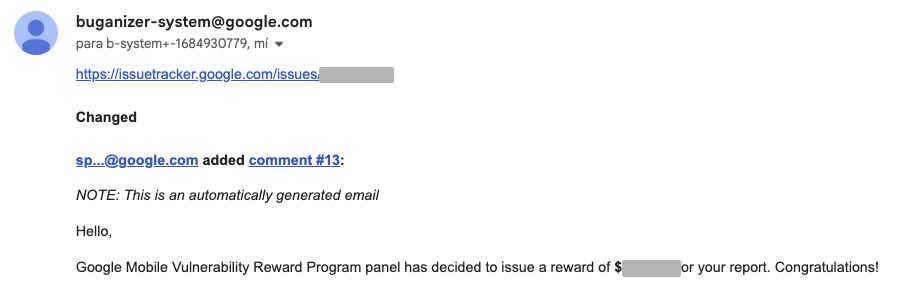 Reward notification from Google Mobile VRP. Issue ID and amount redacted.
Timeline
1
2
3
4
May 1, 2026    Reported to Google VRP
May 27, 2026   Accepted
Jun 12, 2026   Fixed by the product team
Jul 2, 2026    Rewarded by Google Mobile VRP
Disclosure note: this write-up was prepared after Google marked the issue as fixed and after I notified the VRP team of my intent to publish. Thanks to the Google Bug Hunters and Google Mobile VRP teams for the clear communication and professional handling throughout triage.
The bug in one diagram
1
2
3
4
5
6
7
8
9
10
11
12
13
14
Attacker app
no READ_CONTACTS
      |
      | content://messages.avatar/r?m=content://contacts/.../photo
      v
Google Messages AvatarContentProvider
      |
      | reads source URI as the Messages UID
      v
Android ContactsProvider
      |
      | protected photo bytes
      v
Google Messages returns rendered PNG to attacker
The attacker could not read Contacts directly. But it could ask an exported Google Messages provider to read a caller-controlled Contacts URI, then receive the rendered result.
That is a classic confused deputy: a less-privileged app causes a more-privileged app to perform an action on its behalf.
The exposed provider
Google Messages exposed this content provider:
1
content://com.google.android.apps.messaging.shared.ui.avatar.AvatarContentProvider
The provider was exported, did not require a caller permission, and accepted a source avatar URI through the m query parameter:
1
content://com.google.android.apps.messaging.shared.ui.avatar.AvatarContentProvider/r?m=<urlencoded source uri>
That design became dangerous when the source URI pointed at a protected Contacts photo:
1
content://com.android.contacts/contacts/<CONTACT_ID>/photo
The manifest entry was the first useful signal:
1
2
3
4
provider name="com.google.android.apps.messaging.shared.ui.avatar.AvatarContentProvider"
exported=true
authorities="com.google.android.apps.messaging.shared.ui.avatar.AvatarContentProvider"
grantUriPermissions=true
There was no required permission on the provider. In my test environment, Google Messages had Contacts access, while the proof-of-concept app did not request READ_CONTACTS or WRITE_CONTACTS.
The Messages build I reported, current in my test environment at the time, was:
1
2
3
Package: com.google.android.apps.messaging
Version: messages.android_20260306_02_RC09.phone_dynamic
Version code: 302567063
Reproducing the boundary bypass
The PoC app was intentionally boring. It took a URI from an intent extra and called normal ContentResolver APIs such as getType(), query(), openInputStream(), and openFileDescriptor().
First, I tried to read a contact photo directly from an app with no Contacts permissions:
1
2
3
4
adb shell am start -S -n com.local.vrpprobe/.ProbeActivity \
  --es mode query-uri \
  --es uri content://com.android.contacts/contacts/CONTACT_ID/photo
adb shell logcat -d -s VRPProbe
The result was expected:
1
2
openInputStream content://com.android.contacts/contacts/CONTACT_ID/photo
  -> SecurityException: requires android.permission.READ_CONTACTS or android.permission.WRITE_CONTACTS
Then I sent the same protected Contacts URI through the Google Messages provider:
1
2
3
adb shell am start -S -n com.local.vrpprobe/.ProbeActivity \
  --es mode query-uri \
  --es uri 'content://com.google.android.apps.messaging.shared.ui.avatar.AvatarContentProvider/r?m=content%3A%2F%2Fcom.android.contacts%2Fcontacts%2FCONTACT_ID%2Fphoto'
This time the attacker app received image bytes:
1
2
3
type -> image/png
openInputStream ...contacts/568/photo -> bytes=11842 sha256=45d0e3e771dcb309
openFileDescriptor -> opened
A different synthetic contact photo produced a different PNG:
1
openInputStream ...contacts/569/photo -> bytes=17350 sha256=41b7196c83716dfb
Non-existent contact IDs returned the provider’s default fallback avatar instead. That fallback had a stable size and hash, which made the issue enumerable: an app could iterate numeric contact IDs and keep every response that did not match the default image.
Why this was not just an exported provider
An exported provider is the attack surface. The permission bypass is the impact.
If this provider had only returned public data owned by Google Messages, the bug would have been much less interesting. The important mistake was allowing an exported provider to dereference arbitrary caller-controlled content:// URIs with Google Messages’ own ambient permissions, then returning derived bytes to the caller.
For permission-gated providers like Contacts, the identity of the process doing the read matters. A direct read from the attacker UID failed. A read performed by the Messages UID succeeded. Once Messages converted the protected photo into a PNG and streamed it back, the original permission boundary had already been bypassed.
Static inspection matched the runtime behavior. The avatar provider parsed the primary avatar URI from the m parameter, ran it through an internal safety check, and then loaded the image through the Google Messages bitmap-loading path.
Impact
The attacker needed code execution as an installed app on the same Android device. No root access, SMS permission, account access, or Contacts permission was required by the attacker app.
When Google Messages had access to Contacts, the bug allowed silent extraction of contact photos stored behind Android’s Contacts permission model. The leaked field was limited to the photo, not the full contact record, but it was still protected Contacts provider data. Android intentionally prevents arbitrary apps from reading content://com.android.contacts/contacts/<id>/photo, and this provider path bypassed that restriction.
The practical impact was also helped by two details:
- Contact IDs are numeric and easy to scan.
- The default avatar response was stable, so real photos could be separated from fallback responses by size or hash.
Lessons for Android developers
The safe pattern is to avoid exported providers that fetch arbitrary caller-supplied URIs under the app’s own privileges. In practice:
- Do not dereference untrusted
content://URIs with your app’s own permissions. - If external callers need to supply a URI, require an explicit URI grant or verify that the original caller can access the source.
- Treat image rendering, resizing, caching, and transcoding as data disclosure if the original source is permission-protected.
- Prefer serving opaque resources owned by your app instead of accepting arbitrary backend URIs from other apps.
- Make providers non-exported or protect them with an internal/signature permission unless external access is truly required.
In short: if a provider accepts a URI from another app, it should treat that URI as untrusted input and should not become a permissions proxy for it.